




Updates
Version 1.0.1 May 24- 2023
- Fixed bugs import live demo


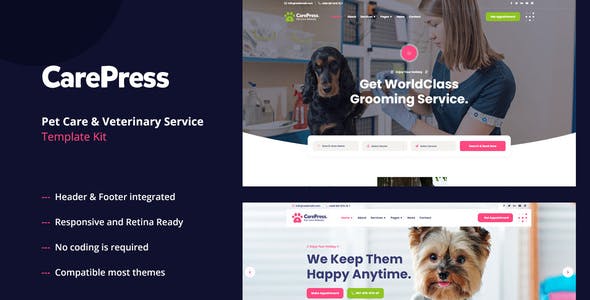
CarePresstemplate kit is designed for Pet Care industry- including pet daycare- pet salon- pet centers- pet stores- pet hospital- veterinary clinics- and all pet care websites. CarePress – Pet Care & Veterinary Template Kit is used the popular Elementor page builder plugin- no need to understand codding
Kit Key Features:
- 02 Homepage Versions.
- No Coding Knowledge
- Fully with Elementor free version ( Elementor Pro is not required )
- Header & Footer Builder Included
- One Click Import
- Unique and Modern Style.
- Awesome and Creative Design.
- Lifetime Free Updates
- Cross browser compatible
- Post Widget
- Carousel Slide Box ( Create sliders with anything )
- Responsive and Retina Ready
- Compatible with most WordPress themes
- Optimized for search engines
Required Plugins installed with kit:
- Elementor (Free)
- Themesflat Addons For Elementor
- MetForm
- HT Mega – Absolute Addons for Elementor
- ElementsKit Lite
- Stratum – Elementor Widgets
- WooCommerce
How to Install:
- Install and Activate the “Template Kit Import” plugin from Plugins > Add New in WordPress
- Do not unzip
- Go to Elements > Installed Kits and click the Upload Template Kit button.
- Before importing a template- ensure the Install Requirements button is clicked to activate required plugins
- For best results- do not import more than one template at a time.
For further support- go to Elementor > Get Help in WordPress menu.
How to Import Metforms
- Import the metform block templates
- Import the page template where the form appears and right-click to enable the Navigator
- Locate and select the Metform widget and click Edit Form. Choose New- then Edit Form. The builder will appear
- Click ‘Add Template’ grey folder icon.
- Click ‘My Templates’ tab.
- Choose your imported metform template- then click ‘Insert’ (click No for page settings).
- Once the template is loaded- make any desired customizations and click ‘Update & Close’ The form will appear in the template
- Click Update
Setup Global Header and Footer in ElementsKit
- Import the header and footer template
- Go to ElementsKit > Header Footer select Header and click Add New
- Give it a title- leave Entire Site selected and toggle Activation to On
- Click the template title and Edit Content
- Click the gray folder icon and select the header template to import and Update.
- Repeat for Footer
This Template Kit uses demo images from Envato Elements. You will need to license these images from Envato Elements to use them on your website- or you can substitute them with your own.
- https://elements.envato.com/image-RNJNFNK
- https://elements.envato.com/image-TFDCEFX
- https://elements.envato.com/image-W73EUUE
- https://elements.envato.com/image-WDL9YXT
- https://elements.envato.com/image-4E3RMW5
- https://elements.envato.com/image-PVJ5A33
- https://elements.envato.com/image-JRNE8ZH
- https://elements.envato.com/image-MKAYC2F
- https://elements.envato.com/image-CQY7SG5
- https://elements.envato.com/image-JAPNMTP
- https://elements.envato.com/image-2D2WT2H
- https://elements.envato.com/image-3RD3U4W
- https://elements.envato.com/image-NQ7YD3C
- https://elements.envato.com/image-FSMCK2D
- https://elements.envato.com/image-NQYDAU6
- https://elements.envato.com/image-ZM78DA6
- https://elements.envato.com/image-SQEFRT4
- https://elements.envato.com/image-PSVF5XP
- https://elements.envato.com/image-GEBLU2K
- https://elements.envato.com/image-E2NQ2W6
- https://elements.envato.com/image-ERYKV7A
- https://elements.envato.com/image-TXA95F9
- https://elements.envato.com/image-MRGMY79
- https://elements.envato.com/image-PJ7TNG2
- https://elements.envato.com/image-PPYWQX6
- https://elements.envato.com/image-QEBNKW7
















Reviews
Clear filtersThere are no reviews yet.