


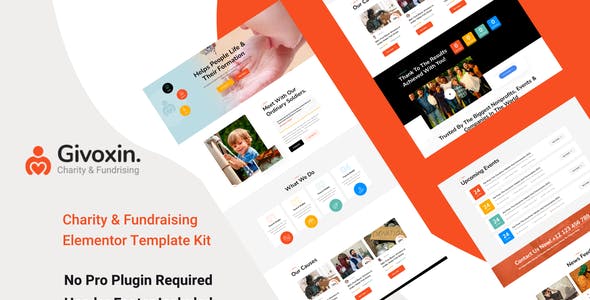


Givoxin clean professional Charity Elementor Template Kit which fits for all kinds of charity- fundraising- nonprofit- NGO- donations- and all other non-profit charity websites- businesses- and NGOs. It has a purpose-oriented design- responsive layout- and special features like Home page- blog layouts- Causes- and Event.
Features:
- Clean- Professional design
- Responsive to different devices
- Build with Elementor page builder
- Google fonts
- Social links
Templates:
- Global Styles
- Page – Home
- Page – About
- Page – Mission
- Page – Team
- Page – Gallery
- Page – Faq
- Page – Event
- Page – Event Details
- Page – Causes
- Page – Cause Details
- Page – Contact
- Section – Header
- Section – Footer
Required Addons
- Elementor
- ElementsKit Lite
- Essential Addons for Elementor
- Elementor Header & Footer Builder
- MetForm
How to Use Template Kits:
- Install and Activate the “Envato Elements” plugin from Plugins > Add New in WordPress
- Download your kit file and Do not unzip
- Go to Elements > Installed Kits and click the Upload Template Kit button. You may also import automatically by clicking Connect Account to link your Elements subscription- then import under Elements > Template Kits.
- Check for the orange banner at the top and click Install Requirements to load any plugins the kit uses
- Click import on the Global Kit Styles first
- Click Import on one template at a time. These are stored in Elementor under Templates > Saved Templates.
- Go to Pages and create a new page and click Edit with Elementor
- Click the gear icon at lower-left of the builder to view page settings and choose Elementor Full Width and hide page title
- Click the gray folder icon to access My Templates tab and then Import the page you’d like to customize.
If you have Elementor Pro- headers and footers may be customized under Theme Builder.
Detailed Guide: https://help.market.envato.com/hc/en-us/articles/900000842846-How-to-use-the-Envato-Elements-WordPress-Plugin-v2-0
For further support- go to Elementor > Get Help in WordPress menu.
How to Import Metforms
- Import the metform block templates
- Import the page template where the form appears and right-click to enable the Navigator
- Locate and select the Metform widget and click Edit Form. Choose New- then Edit Form. The builder will appear
- Click ‘Add Template’ grey folder icon.
- Click ‘My Templates’ tab.
- Choose your imported metform template- then click ‘Insert’ (click No for page settings).
- Once the template is loaded- make any desired customizations and click ‘Update & Close’ The form will appear in the template
- Click Update
Setup Global Header and Footer in Header Footer & Blocks pluginOnly if you do not have Elementor Pro.
- Import the header and footer template
- Go to Appearance > Header Footer and click Add New button
- Give it a title and select Header- Display on Entire Site and click Publish
- Click Edit with Elementor
- Click the gray folder icon to access My Templates tab and select the header template to import and Update.
- Repeat for Footer
Images:
This Elementor Template Kit uses demo images from Envato Elements. You will need to license these images from Envato Elements to use them on your website- or you can substitute them with your own.
- https://elements.envato.com/image-PSZHX3T
- https://elements.envato.com/image-PBQ97EL
- https://elements.envato.com/image-BFXKC7L
- https://elements.envato.com/image-GPHFD3Z
- https://elements.envato.com/image-UAP7FZD
- https://elements.envato.com/image-8USKRKG
- https://elements.envato.coma-water-pump-in-rural-nepal-93MXNVL
- https://elements.envato.com/image-K5FH5EJ
- https://elements.envato.com/image-Q3EMP88
- https://elements.envato.com/image-KDH2AJR
- https://elements.envato.com/image-N33EQLJ
- https://elements.envato.com/image-MTBPRY8
- https://elements.envato.com/image-SY6SM2X
- https://elements.envato.com/image-HLP2574
- https://elements.envato.com/image-UDXNGX6
- https://elements.envato.com/image-F6EQFKF
- https://elements.envato.com/image-LR22BYT
- https://elements.envato.com/image-DWRTZXF
- https://elements.envato.com/image-VS84H3Q
- https://elements.envato.com/image-S73SGMN
- https://elements.envato.com/image-93MXNVL
- https://elements.envato.com/image-K25S6AK
- https://elements.envato.com/image-LFCVX8L
- https://elements.envato.com/image-PX76BSY
- https://elements.envato.com/image-J3XLUPE
- https://elements.envato.com/image-9SVXQB3
- https://elements.envato.com/image-QN7SHHD
- https://elements.envato.com/image-RWZRQSX
- https://elements.envato.com/image-67VUN3N
- https://elements.envato.com/image-HEG9YVS
- https://elements.envato.com/image-PJU7TRC
- https://elements.envato.com/image-42KLV9R
- https://elements.envato.com/image-T44BHQJ
- https://elements.envato.com/image-RU2XZEY
- https://elements.envato.com/image-P2V3RRH
- https://elements.envato.com/image-6UKXNZ4
- https://elements.envato.com/image-3PM8ZVX
- https://elements.envato.com/image-QNDHHTV
- https://elements.envato.com/image-4R5EHC3
- https://elements.envato.com/image-R4KEPEU
- https://elements.envato.com/image-CQ83KGU
- https://elements.envato.com/image-AS7AKM5
- https://elements.envato.com/image-GCMPM8W
- https://elements.envato.com/image-AK7UKK7
- https://elements.envato.com/image-9F4N8JB
- https://elements.envato.com/image-MEDGPSH
- https://elements.envato.com/image-AWQYXKH
- https://elements.envato.com/image-8W6EAF7
- https://elements.envato.com/image-35JQY6P
- https://elements.envato.com/image-B66DQGR
- https://elements.envato.com/image-4Q7K5JK
- https://elements.envato.com/image-75C349Y
- https://elements.envato.com/image-A9DMAPQ
- https://elements.envato.com/image-EAJ8RGV
- https://elements.envato.com/image-FCBF8ZF
- https://elements.envato.com/image-XDXCFU4















Reviews
Clear filtersThere are no reviews yet.