




Updates
Version 1.0.1 May 24- 2023
- Fixed bugs import live demo


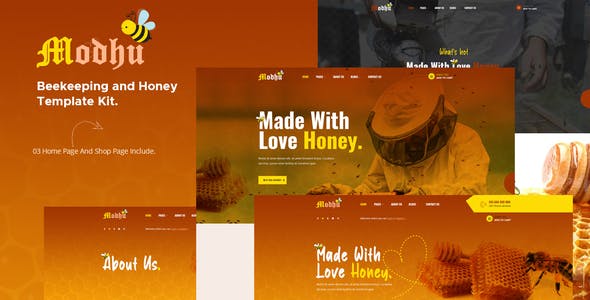
Modhu – Beekeeping and Honey Template Kit
Modhu is an Elementor Template Kits build for the website of honey production- Beekeeping techniques and organic food. It’s special design for Website introduction of honey products- the store sells honey products. After importing the demo- you just need to change some information on the template to have a complete website. It is optimized for seo very well. All of the copyrighted images you can use for your website. You are looking for a WordPress honey website- or a Honey shop- this is the best choice
Required Plugins :
- Elementor (Free)
- Themesflat Addons For Elementor (Free) (By Themesflat )
- MetForm
- Woo Products Widgets For Elementor
- WooCommerce
- WooLentor – WooCommerce Elementor Addons + Builder
Kit Key Features:
- One Click Import
- 3 Homepage Versions.
- Shop Pages Include.
- Modern Style.
- Super Clear and Clean Layout
- Unique and Creative Design.
- Free PSD File After Purchased
- Lifetime Free Updates
- 24/7 Customer Support
- Cross browser compatible
- Built-in Header Footer
- Support Post Widget
- Support Carousel Slide Box ( Create sliders with anything )
- Ultra Responsive and Retina Ready
- Compatible with any WordPress theme
- Optimized for search engines
How to Install:
- Install the plugin from Plugins > Add New by searching for Template Kit Import. If you use FTP to install plugins- you can download it from
- Once the plugin is activated- go to Tools > Template Kit
- Click on Upload Template Kit ZIP File to browse to your zip file and import.
- Your Template Kit preview will appear. Click View Installed Kit:
- An orange banner will appear if your kit requires additional free plugins. Click Install Requirements for details.
- A popup will appear listing the plugins your kit needs installed or activated. Click Install Requirements to proceed.
- Now you may begin importing your templates by clicking the Import Template button on the desired template..
https://wordpress.org/plugins/template-kit-import


How to import Metform custom form
- Import metform template –
- Import the template where the form appears- then edit in Elementor. –
- Click the Metform widget in the column where the form should be and click Edit Form. –
- Select New- leave blank selected then click Edit Form button –
- Click ‘Add Template’ grey folder button. –
- Click ‘My Templates’ tab. –
- Choose your imported metform template- then click ‘Insert’.
- Once the template is loaded- click ‘Update’.
This Template Kit uses demo images from Envato Elements. You will need to license these images from Envato Elements to use them on your website- or you can substitute them with your own.
- https://elements.envato.com/image-HSMPNTR
- https://elements.envato.com/image-AUQPXGM
- https://elements.envato.com/beekeeper-works-with-honeycomb-full-of-bees-outdoo-MGX2QP9
- https://elements.envato.com/image-KLLJRZK
- https://elements.envato.com/beekeeper-is-working-TZ6JVW5
- https://elements.envato.com/image-PBPQ7UT
- https://elements.envato.com/image-MGX2QP9
- https://elements.envato.com/image-H4CWEZH
- https://elements.envato.com/image-JRALKDP
- https://elements.envato.com/image-9HN7D97
- https://elements.envato.com/image-98XJADP








Reviews
Clear filtersThere are no reviews yet.