






If you’ve ever wished you had a Pro Image Editor inside your WordPress dashboard- you’ve found the perfect plugin for the job!
ALL-IN-ONE IMAGE EDITOR
An Image Editor That’s Easy to Use and Incredibly Effective
ProVision gives you a Pro Image Editor inside of your WordPress Dashboard. You can edit images on the fly and create better experiences for your customers.
ProVision has all the tools and effects you need to make wow-worthy images.
Edit WordPress Images & WooCommerce Product Images
Using ProVision you can edit the Original / Post_Thumbnail / Large / Medium_Large / Medium / Thumbnail & also WooCommerce Product Images!
You read that right! ProVision gives you the possibility to edit all images sizes available on WordPress and also WooCommerce Product Images. If you automatically crop all images sizes- you might not be satisfied with the result.
You might get weird-looking thumbnails that are not centered or simply bad looking.
Using ProVision you can edit and adjust each thumbnail individually! Pretty cool right?
Face Detection
Images are usually cropped according to the center- which can leave out the images’ most significant part if the person’s face is on the top- left or right side.
More awkward crops of full body shots can isolate a person’s neck down to the elbows- rather than center around the face.
This feature allows you to generate thumbnails without cutting heads or faces from your images. It detects whether images have human faces in it- Therefore when generating thumbnails- the image will be face-centered.
IMAGE ADJUSTMENTS
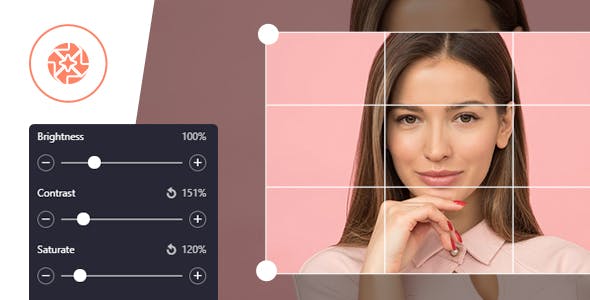
Modify image brightness and contrast– enhance colors in your picture by changing its saturation and optimize color temperature by using the “Sepia” and “Grayscale” effects. Use the “Blur” tool to add cool effects to your images.
The image adjustment tool works smoothly and all the changes are applied to your images in realtime.
1-Click Crop- Resize- Rotate
Basic operations like image cropping and rotation are the ones that you need most often. Therefore- we made them extremely easy-to-use- intuitive and fast.
Use the ‘Rotate’ tool to rotate a picture 360 degrees clockwise or counterclockwise or flip it vertically or horizontally. To crop an image- just click and drag a corner or a side of a crop frame- and you are done!
COOL FILTERS & EFFECTS
1997- Clarendon– Aden these awesome image filters and effects are an essential part of modern image editing.
27+ Instagram like FILTERS
Compare Original with Edited image
ProVision has a comparison tool that allows you to compare the original image with the edited one before saving.
This way you can check if the edited image has visual improvement or not.
Folders File Manager
Using ProVision- you can easily organize media into virtual folders.
In the default WordPress media interface- you are not able to arrange files logically.
With ProVision you can keep all of your media files organized into folders and subfolders.
That way it’s much easier to browse through thousands of images when you have them organized right?
Reset / Restore
ProVision also has a reset button if you want to revert to the original image- and also if you accidentally saved an image and you don’t like it you can restore the old one!
Zoom / FullScreen
If you wish to work in full screen when you’re editing your images- ProVision has this option also! Zoom in images? Of course- it’s available! Use your mouse scrollbar or simply use the zoom bar from the editor!
Full Features List
- Newbie Friendly- Fully Tested – No tech skills needed.
- Works as Plugin on WordPress – version 5.2+
- 1-Click Crop- Resize- Rotate
- Face Detection Tool
- IMAGE ADJUSTMENTS – Brightness / Contrast / Saturate / Grayscale / Sepia / Blur / Invert
- 27 Cool Instagram Filters
- Zoom / FullScreen tools
- Compare original image with edited one
- Reset image / restore original image
- Folders File Manager – Create Virtual Folders & Subfolders
- Edit Original / Post_Thumbnail / Large / Medium_Large / Medium / Thumbnail & also WooCommerce Product Images
- After you save image you can preview the saved image and check its new file size.



















Reviews
Clear filtersThere are no reviews yet.