




The WooCommerce Conditional Product Fields at Checkout plugin allows you to display additional product fields at checkout! Fields can be dynamically displayed according to logic rules…and all done using a nice visual editor!
LIVE DEMO
https://www.codecanyondemo.work/wcpfc/wp-admin
(Shop admin account)
user: demo
pass: demo
(customer account)
user: demo2
pass: demo

DOCUMENTATION
How to automatically update the plugin
To receive automatic updates just install and configure the Envato updater plugin: httpss://goo.gl/pkJS33 .The official guide that explains how to configure it can be found at the following link: httpss://envato.com/market-plugin .
How it works
The plugin through a visual editor allows the creation of extra product fields that will be shown on the Checkout page. Each field can have its own conditional rules by which the plugin determines if it has to be shown or not. Conditional rules can take into consideration other conditional field values or WooCommerce native checkout field values like:
- Billing fields
- Shipping fields
- Payment methods
At last but not least- each field can be shown just one time per order- one time per product– or one time for each product cart quantity.
Examples
For example- you can:
- Create a field that will be showed only if the Billing country is Italy and State/Province is Rome
- Create a field that will be showed only if the Payment method is PayPal
- After creating a text field named “field1”- you can create a second field that will be shown only if “field1” contains the phrase “hello world”- and so on!
- After creating a date field “field1”- you can create a second field that will be shown only if the selected date for “field1” is greater than 25th December 2018
And so on!
Conditional logic and dynamical field display
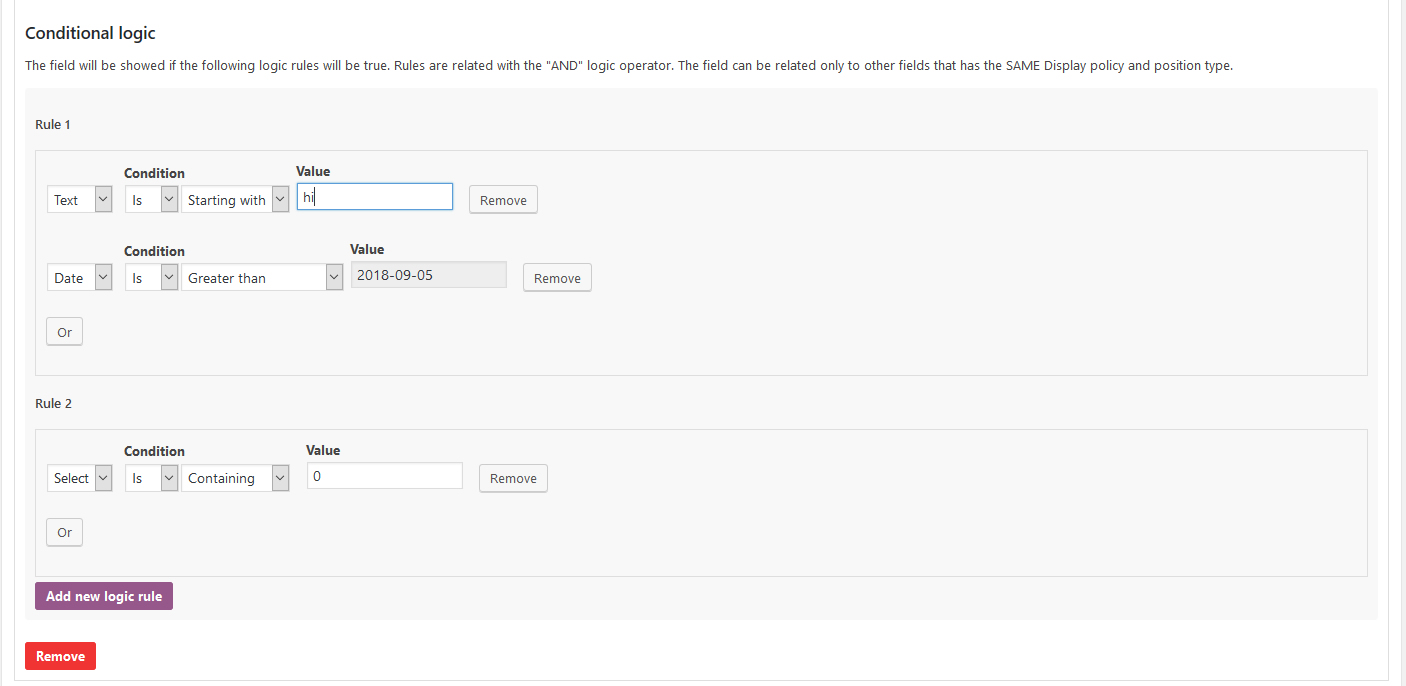
Each field can have several “and/or” conditional rules that will make the field dynamically visible only if satisfied. A conditional rule can be related to other fields values or the native billing/shipping checkout fields.
Note: that in case of other custom field values- the logic rule can be created only for fields that have the same Display policy and Position options.
Field types
The plugin will allow the shop admin to create the following field types:
- Text
- Textarea
- Number
- Select/Multiselect
- Date
- Time
- Country & state
- HTML
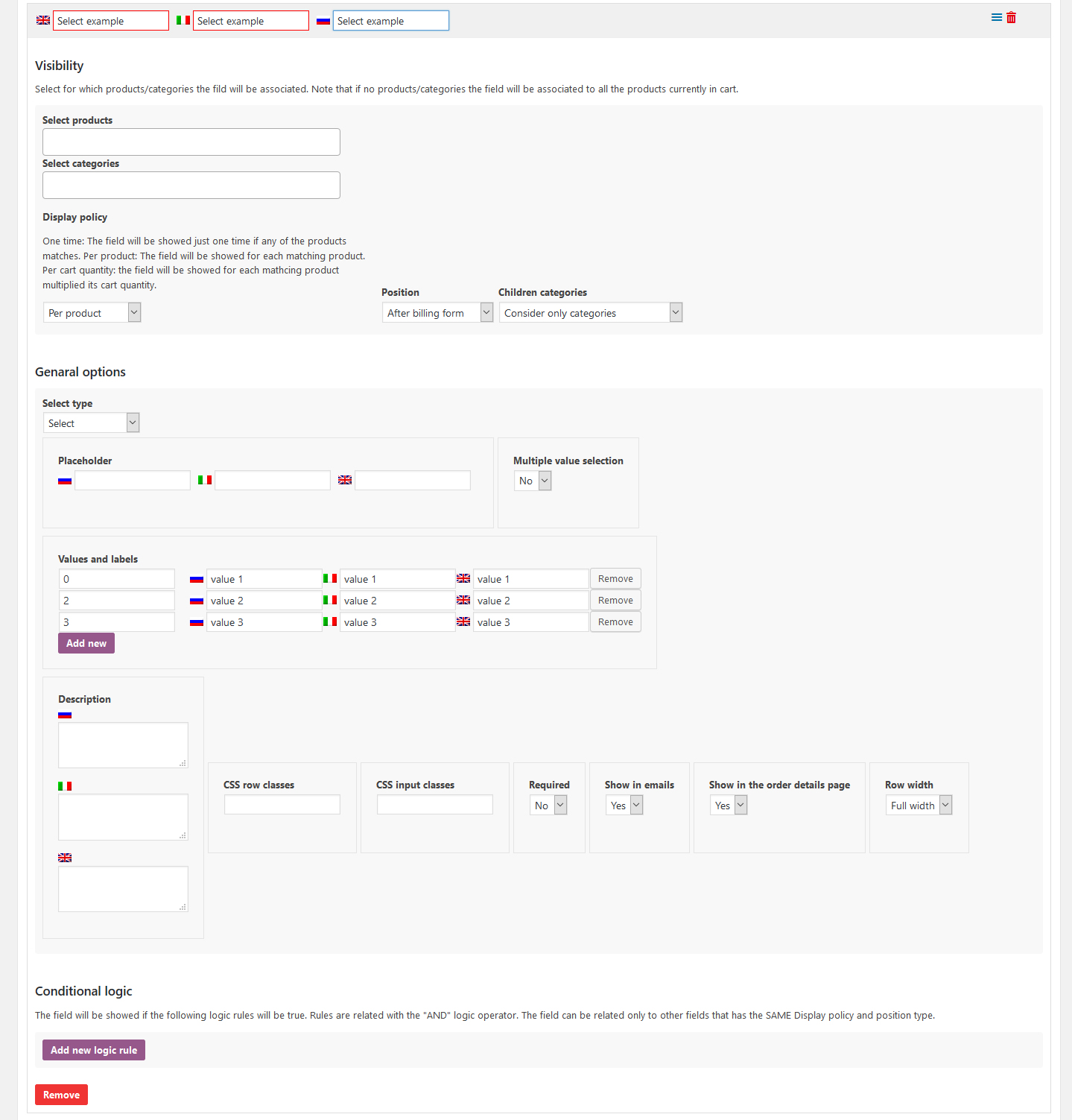
For each field you can configure its own options like CSS classes to assign to the input field- placeholder text- show on emails- show on the order details page- row size- etc.
NOTE: HTML field will be displayed ONLY on checkout page. It can be used to visual organize other fields (for example creating headings).
Visibility according to products/categories
A field can be displayed only for the selected products or categories. If none is selected- the plugin will display one field for each product in the cart. Selecting a category- the plugin will show one field for each product matching the selected categories.
Display policy
By default- the plugin will show a field for each matching product. However- you can select choosing among the following options:
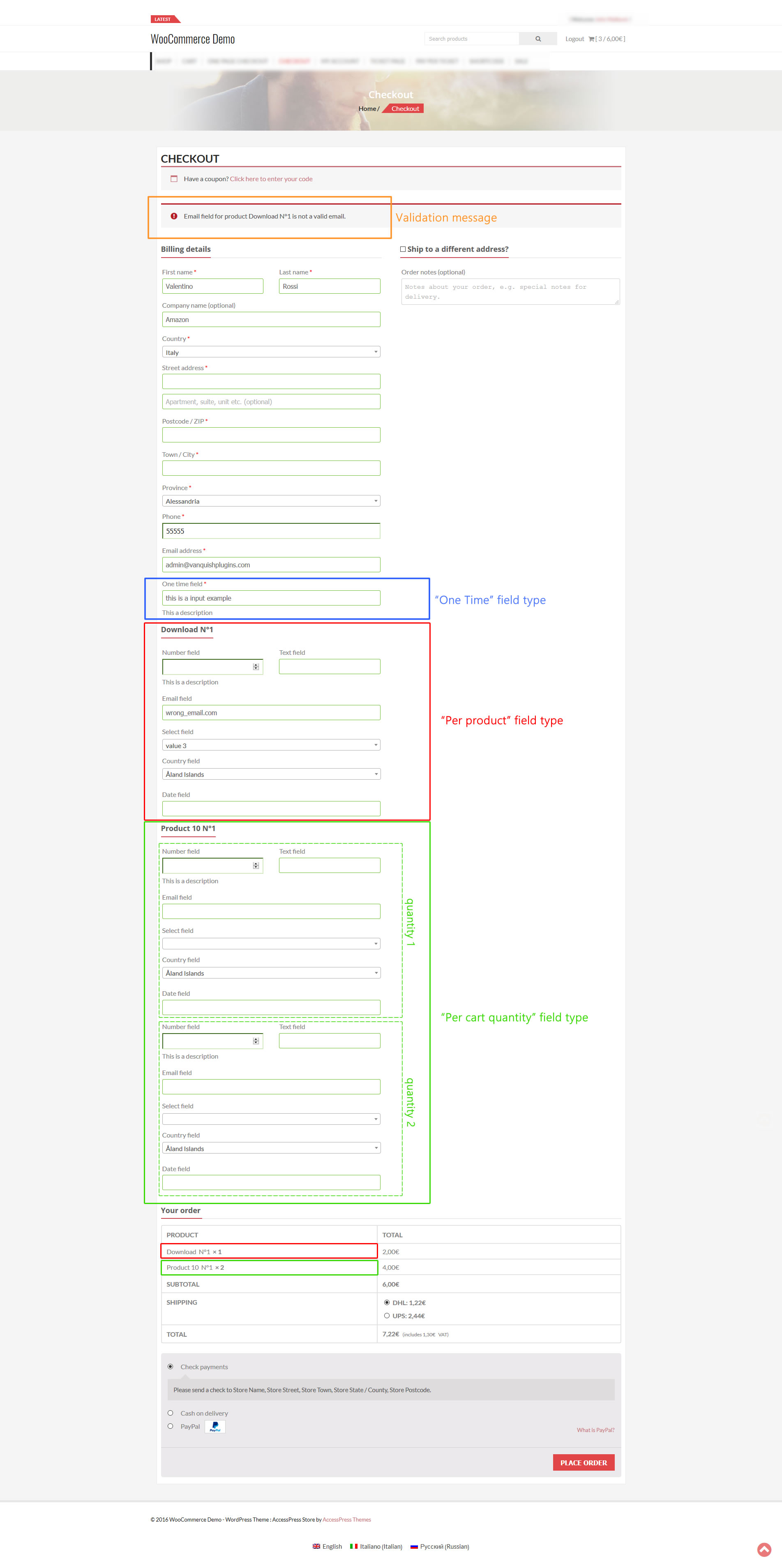
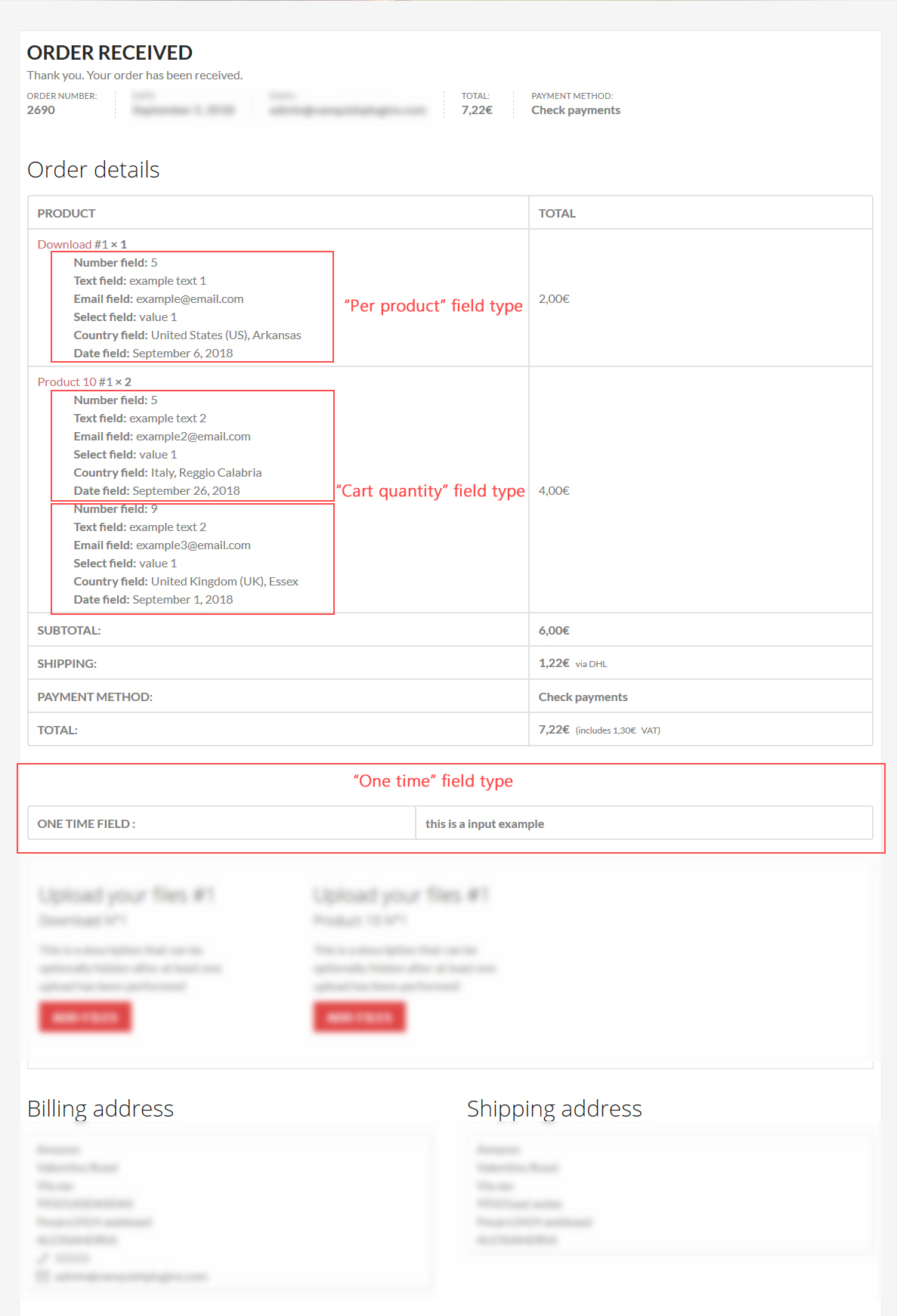
- Per product: the field will be shown just one time for matching products
- Per cart quantity: the field will be shown N times for matching products- where N is the cart quantity
- One time: just one time if at least one of the selected products/categories matches with the ones currently in the cart.
Position
You can choose where the field will be displayed: after billing or shipping forms.
Note: in case of shipping form selection- the field will be shown only if the Ship to a different address option has been checked during the checkout. Otherwise- the shipping form won’t be shown by WooCommerce and then the field will be invisible.
Country & state field note
Can be selected only the states/provinces for the allowed sell countries configured in the WooCommerce -> Settings -> General menu.
WPML compability
If WPML is detected- the plugin will automatically show multilanguage input fields for labels- placeholders- etc. In this way- you can enter different texts for each language.
Frontend integration
Additional fields will be seamlessly integrated into (in case of “one time” field type) or after (in case of “per product” or “per cart quantity” field type) the Billing/Shipping form if the associated conditional rules (if any) are satisfied. Note: in case of shipping form selection- the field will be showed only if the Ship to a different address option has been checked during the checkout. Otherwise- the shipping form won’t be shown by WooCommerce and then the field will be invisible.
The plugin will also display some validation message once the order is placed in case of mandatory fields- wrong email format- or if a numeric value is not in the preselected range
Backend integration
Additional fields will be seamlessly integrated into the order details page according to the field type. One-time fields are reported under the customer billing/shipping details (according to the field position) and the Product/Cart quantity field type is reported under each product to which they refer.
Note on altered checkout forms
If you have altered in any way checkout forms by adding/removing/customizing fields using 3rd party plugin- this may interfere with the plugin causing it to not properly work.
SCREENSHOTS
Field configurator page
Condition logic – Field configurator page
Checkout page
Order details page
Notification email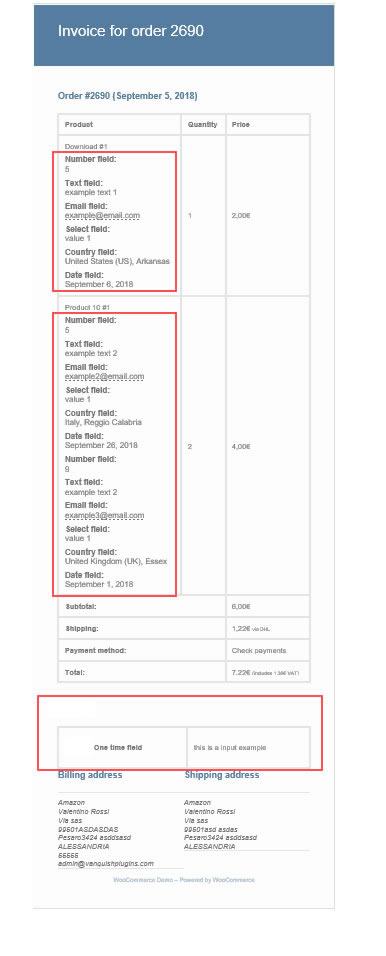
Admin order details page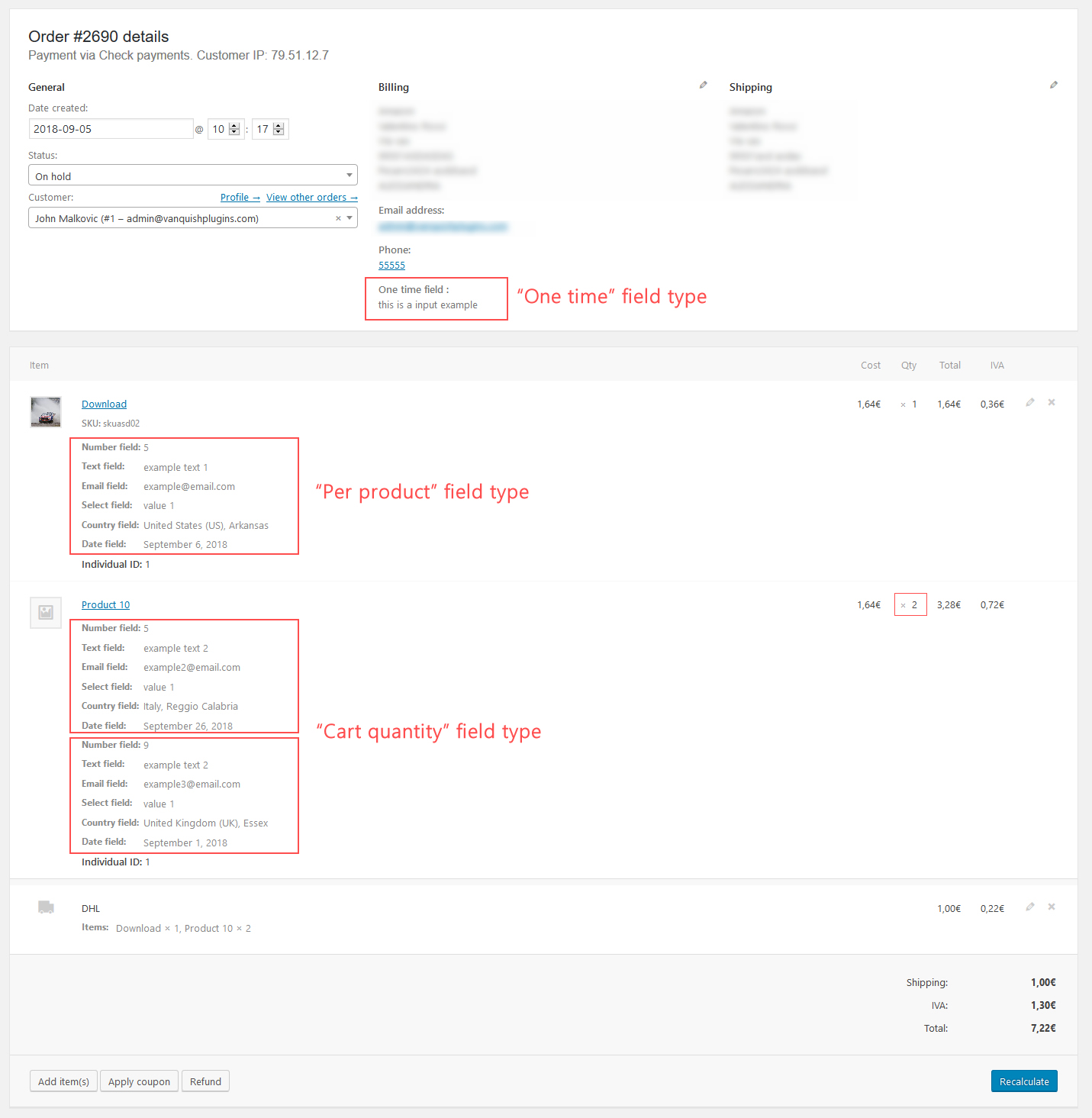
= 5.8 - 10.08.22 =* Fixed an issue related to the Order datails page= 5.7 - 14.07.22 =* Fixed an issue that prevented the field to be properly displayed when "shipping/billing country" conditions were used= 5.6 - 25.02.22 =* Fixed an issue due to time fields were not properly displayed on the admin order details page= 5.5 - 18.10.21 =* Bugfix= 5.4 - 11.10.21 =* Bugfix= 5.3 - 27.07.21 =* Code Redesign= 5.2 - 02.03.21 =* Bugfix= 5.1 - 29.12.20 =* Fixed an issue when using date fields- when excluding just one day- the fields were not properly rendered= 5.0 - 08.09.20 =* Minor improvement= 4.9 - 20.08.20 =* Fixed an issue related to the delete process= 4.8 - 19.08.20 =* Minor bugfix= 4.7 - 18.08.20 =* Fixed an issue related to the logic condition configurator= 4.6 - 06.05.20 =* Fixed an issue related to WPML= 4.5 - 04.05.20 =* Minor bugfix= 4.4 - 02.04.20 =* Fixed an issue with date display format= 4.3 - 09.03.20 =* Added option to disable specific day of the week for date selector= 4.2 - 19.02.20 =* Bugfix related to the date and time fields= 4.1 - 08.02.20 =* Fixed an issue due to field headers being shown after the shipping form even if they should not= 4.0 - 04.01.20 =* Fixed an issue related to the relative max date option= 3.9 - 12.11.19 =* Fixed an issue related to WordPress 5.3 that may prevent field to be properly shown on checkout and on the configuration page= 3.8 - 07.11.19 =* Fixed an issue related to the min/max date selection option for Date field= 3.7 - 04.11.19 =* Fixed an issue related to WPML field label translation on the Order details page= 3.6 - 01.11.19 =* Removed "billing" and "shipping" prefixes for "one time" field type= 3.5 - 21.08.19 =* Fixed an issue related to the checkout validation process for required fields= 3.4 - 10.08.19 =* Fixed an issue the "one time" field type mandatory option was ignored= 3.3 - 31.07.19 =* Unique id is now shown in the field configuration panel= 3.2 - 28.07.19 =* Minor bugfix= 3.1 - 16.07.19 =* Fixed an issue related to mandatory fields and blank character= 3.0 - 11.07.19 =* Product selector now shows only published products= 2.9 - 09.07.19 =* Improved datepicker: is now possible to choose the number of years to show in the year selector= 2.8 - 08.07.19 =* Datepicker widget css improvement= 2.7 - 27.06.19 =* Fixed an issue with the logic operator option and the Country/state selector= 2.6 - 11.06.19 =* Is now possible to multiple select products and categories. The selection box won't close at first selection= 2.5 - 23.04.19 =* HTML field type added= 2.4 - 23.04.19 =* Minor bugfix= 2.3 - 19.04.19 =* Minor bugfix= 2.2 - 10.01.19 =* Minor bugfix= 2.1 - 08.12.18 =* Fields displayed according to product quantity are now visually grouped= 2.0 - 26.11.18 =* Fixed an issue due to fields were not displayed on checkout forms= 1.9 - 21.11.18 =* Fixed an issue due to using a virtual product the plugin crashed at the checkout page (thanks to 17seconds)= 1.8 - 21.11.18 =* Fixed an issue due to for Select field- the placeholder value was not properly shown on the configuration menu= 1.7 - 12.11.18 =* Fixed an issue due to required fields being highlighted even if a value was still not inserted= 1.6 - 08.11.18 =* Fixed an incompability with Admin columns pro= 1.5 - 08.11.18 =* Fixed an issue that may raise 500 server error= 1.4 - 08.11.18 =* Fixed an issue due to admin Order preview was not working= 1.3 - 18.10.18 =* Added "Payment methods" to logic options= 1.2 - 05.10.18 =* Added new activation system: now the plugin can be only activated in two domains and they cannot be unregistered= 1.1 - 07.09.18 =* Fixed an issue with select fields and logic rules= 1.0 - 05.09.18 =* First release
= 5.8 - 10.08.22 =* Fixed an issue related to the Order datails page= 5.7 - 14.07.22 =* Fixed an issue that prevented the field to be properly displayed when "shipping/billing country" conditions were used= 5.6 - 25.02.22 =* Fixed an issue due to time fields were not properly displayed on the admin order details page= 5.5 - 18.10.21 =* Bugfix= 5.4 - 11.10.21 =* Bugfix= 5.3 - 27.07.21 =* Code Redesign= 5.2 - 02.03.21 =* Bugfix= 5.1 - 29.12.20 =* Fixed an issue when using date fields- when excluding just one day- the fields were not properly rendered= 5.0 - 08.09.20 =* Minor improvement= 4.9 - 20.08.20 =* Fixed an issue related to the delete process= 4.8 - 19.08.20 =* Minor bugfix= 4.7 - 18.08.20 =* Fixed an issue related to the logic condition configurator= 4.6 - 06.05.20 =* Fixed an issue related to WPML= 4.5 - 04.05.20 =* Minor bugfix= 4.4 - 02.04.20 =* Fixed an issue with date display format= 4.3 - 09.03.20 =* Added option to disable specific day of the week for date selector= 4.2 - 19.02.20 =* Bugfix related to the date and time fields= 4.1 - 08.02.20 =* Fixed an issue due to field headers being shown after the shipping form even if they should not= 4.0 - 04.01.20 =* Fixed an issue related to the relative max date option= 3.9 - 12.11.19 =* Fixed an issue related to WordPress 5.3 that may prevent field to be properly shown on checkout and on the configuration page= 3.8 - 07.11.19 =* Fixed an issue related to the min/max date selection option for Date field= 3.7 - 04.11.19 =* Fixed an issue related to WPML field label translation on the Order details page= 3.6 - 01.11.19 =* Removed "billing" and "shipping" prefixes for "one time" field type= 3.5 - 21.08.19 =* Fixed an issue related to the checkout validation process for required fields= 3.4 - 10.08.19 =* Fixed an issue the "one time" field type mandatory option was ignored= 3.3 - 31.07.19 =* Unique id is now shown in the field configuration panel= 3.2 - 28.07.19 =* Minor bugfix= 3.1 - 16.07.19 =* Fixed an issue related to mandatory fields and blank character= 3.0 - 11.07.19 =* Product selector now shows only published products= 2.9 - 09.07.19 =* Improved datepicker: is now possible to choose the number of years to show in the year selector= 2.8 - 08.07.19 =* Datepicker widget css improvement= 2.7 - 27.06.19 =* Fixed an issue with the logic operator option and the Country/state selector= 2.6 - 11.06.19 =* Is now possible to multiple select products and categories. The selection box won't close at first selection= 2.5 - 23.04.19 =* HTML field type added= 2.4 - 23.04.19 =* Minor bugfix= 2.3 - 19.04.19 =* Minor bugfix= 2.2 - 10.01.19 =* Minor bugfix= 2.1 - 08.12.18 =* Fields displayed according to product quantity are now visually grouped= 2.0 - 26.11.18 =* Fixed an issue due to fields were not displayed on checkout forms= 1.9 - 21.11.18 =* Fixed an issue due to using a virtual product the plugin crashed at the checkout page (thanks to 17seconds)= 1.8 - 21.11.18 =* Fixed an issue due to for Select field- the placeholder value was not properly shown on the configuration menu= 1.7 - 12.11.18 =* Fixed an issue due to required fields being highlighted even if a value was still not inserted= 1.6 - 08.11.18 =* Fixed an incompability with Admin columns pro= 1.5 - 08.11.18 =* Fixed an issue that may raise 500 server error= 1.4 - 08.11.18 =* Fixed an issue due to admin Order preview was not working= 1.3 - 18.10.18 =* Added "Payment methods" to logic options= 1.2 - 05.10.18 =* Added new activation system: now the plugin can be only activated in two domains and they cannot be unregistered= 1.1 - 07.09.18 =* Fixed an issue with select fields and logic rules= 1.0 - 05.09.18 =* First release



















Reviews
Clear filtersThere are no reviews yet.